
Stale NSX Federation site after deleting a VCF 9 workload domain
The short version
We removed a workload domain from VCF 9, including its NSX Local Manager and edge nodes, and forgot one step: taking the site out of the NSX Global Manager federation first. Sadly, VCF 9 does not manage the Global Manager automatically from Operations, so nothing does it for you. The site was still registered on the Global Manager and still listed as a location on our stretched Tier-0 gateways. This post covers what that looks like, why the obvious fixes fail, and how we got out of it.
What we saw
On the Global Manager, under Tier-0 Gateways, the stretched Tier-0 still listed three locations. Two had an edge cluster. The third, showed none, because its edge cluster had been deleted with the workload domain using deletion tool within SDDC Manager or VCF Operations Manager. The location also still appeared under System > Location Manager.
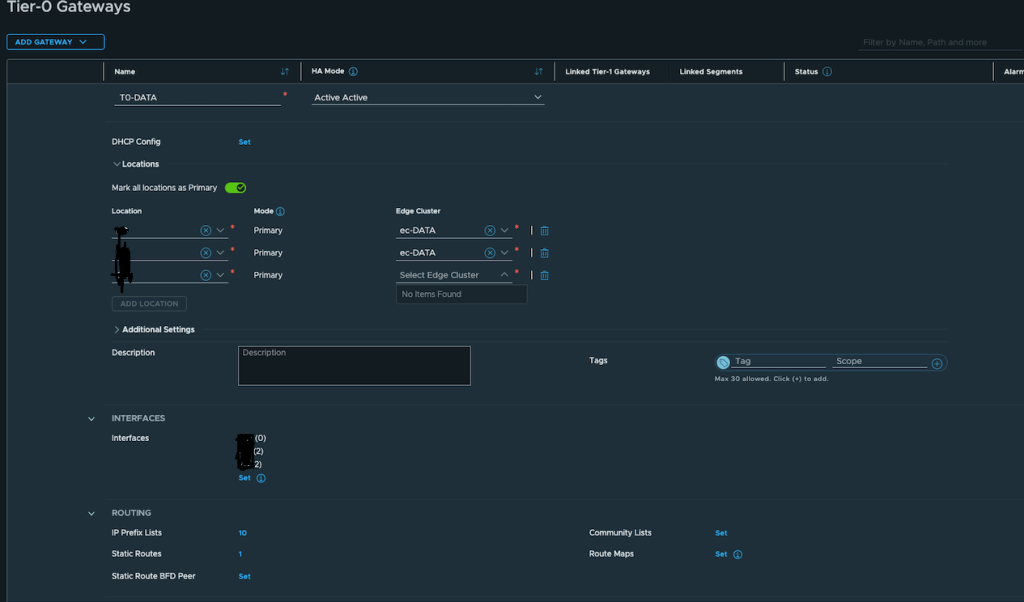
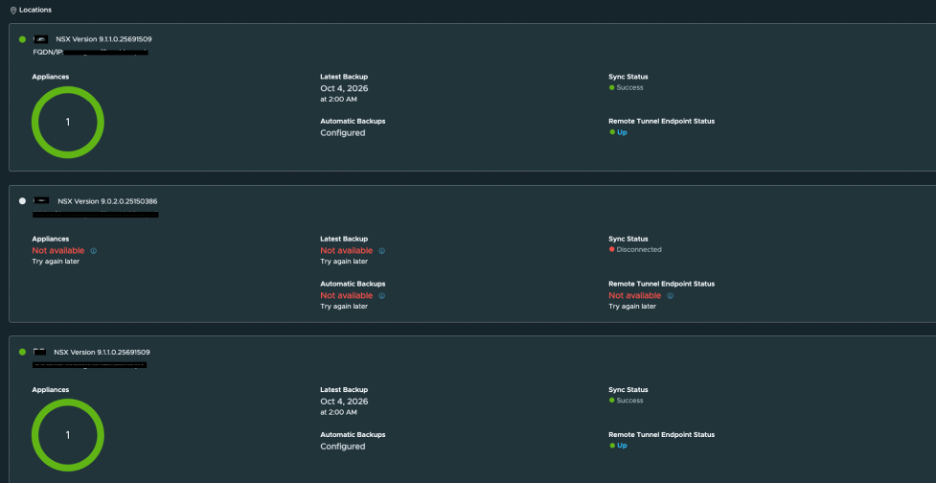
The obvious fix, and why it fails
Removing the location from the Tier-0 in the UI, or deleting the locale-service through the API, fails with an internal server error:
NullPointerException: Cannot invoke "PolicyEdgeCluster.getInterSiteForwardingEnabled()" because "pec" is nullThe locale-service still holds an edge cluster path that points to an object which no longer exists. The Global Manager tries to resolve it while deleting, gets nothing back, and crashes.
Everything else we tried
The Broadcom KB that did not help. The closest article is Unable to remove deleted Local Managers from Federation Global Managers in NSX (KB 444001). It describes our situation exactly: the Local Manager VM was deleted and its FQDN removed from DNS before it was detached from the federation. Its fix is a forced site delete against the Global Manager API, DELETE .../global-infra/sites/<SITE-NAME>?force=true, either from an API client or with curl from the Global Manager shell. We ran it both ways. Both returned error 530024 and listed the objects that still referenced the site. The version of the KB we read does not mention clearing those references first.
- Offboarding the site (
DELETE .../global-infra/sites/SITE_ID, also withforce=true) returns error 530024 and lists every object that still references the site: the locale-services, their BGP configs, the Tier-0s themselves, security configs and prefix lists. Force does not skip this check. - Cleaning the references first works for some of them. We removed the stale location next hops from the static routes (only the stale location hop, not the whole route, because the same routes serve the live sites), and deleted the stale location segments.
- Deleting the BGP config separately is refused on the Global Manager (
deleteOverriddenBgpRoutingConfig is invalid on the global manager). - Editing the locale-service to drop the dead edge cluster path is refused: an edge cluster is required, and the path cannot be changed while the Tier-0 interfaces exist.
The fix
This worked. We restored the deleted stale location Local Manager from its SFTP backup, which brought the missing location object back.
The procedure we follow is Broadcom’s Restore NSX Manager from Backup (KB 373068). A restore is only allowed on a newly deployed appliance whose IP or FQDN matches the backup, so the steps are:
- Deploy a new NSX Manager appliance of exactly the same version and build as the backup.
- Log in to it and open System > Backup & Restore.
- Edit the SFTP server settings and point them at the backup location.
- Pick the backup from Backup History and click Restore.
During the restore, the UI raises a few warnings about things that no longer exist. The edge nodes are missing, because we had deleted them, and the vCenter is unreachable, because the workload domain was deleted. Both are expected.
When the restore finished, the Global Manager showed the stale location as online. From there the cleanup is the normal one: remove stale location from the Tier-0 gateways, then remove the whole location from the Global Manager. Once that is done, the restored Local Manager has no further use and can be deleted.
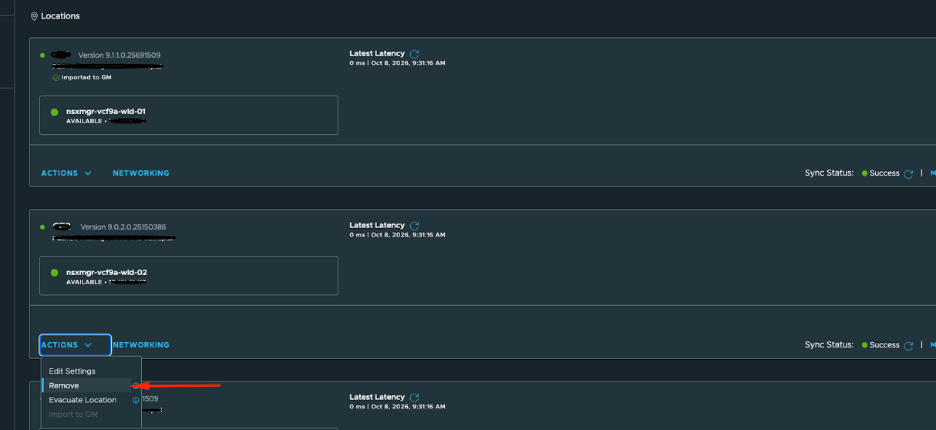
Our reading of why this works: the stale location locale-service on the Tier-0 pointed on location object that lived on the deleted Local Manager. With that object back, the Global Manager no longer hit the NullPointerException when deleting it.
What we should have done
The order matters when decommissioning a federated workload domain. Remove the site from the Global Manager objects first (Tier-0 and Tier-1 locations, stretched segments, static routes and BGP that reference it), offboard the site from Location Manager, and only then delete the Local Manager and the workload domain. Check the Broadcom documentation for your version before you do it.
Lessons
- Take a Global Manager backup before touching federation config.
- Keep Local Manager backups until the site is fully removed from the Global Manager.
- Add the federation cleanup to the workload domain decommission checklist.
